

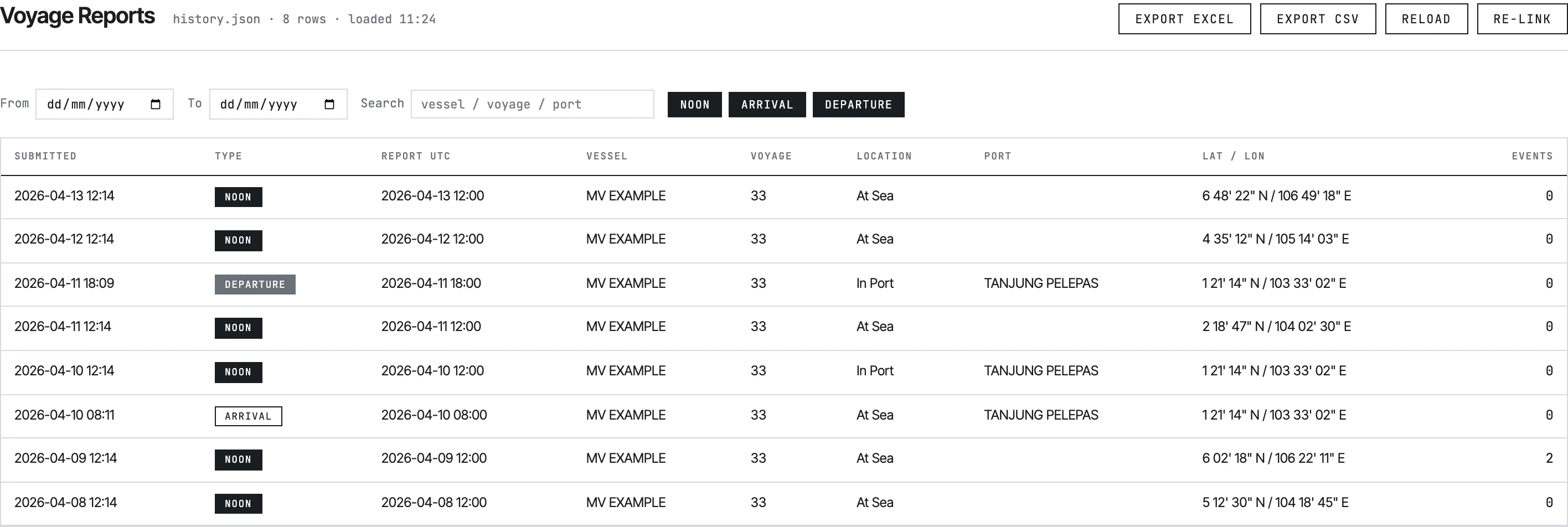
History viewer — Voyage Reports tab.
What it does
- Reads a
history.jsonfile from disk via the File System Access API - Lists every submission across four tabs: Voyage Reports, Statement of Facts, Bunker Reports, Month-End ROB
- Filters by date range and free-text search; the Voyage tab adds NOON / ARRIVAL / DEPARTURE pill toggles
- Clicks a row → opens a detail modal with all 90+ fields organised into seven zones, plus child tables for events, port activities, fuel breakdowns, BDN data
- Exports the filtered set to CSV or Excel (multi-sheet SpreadsheetML)
- Exports a single report from the detail modal to Excel or Print
What it doesn’t do
- No editing. FSA permission is
mode: 'read'. The viewer cannot modifyhistory.json. - No deletion. Same reason.
- No PDF export. Print uses the browser’s print dialog; CSV and Excel are the only file outputs.
- No vessel comparison. It loads one
history.jsonat a time. To compare vessels, switch the linked file via Re-link. - No map view. No geographic visualisation.
How it gets the data
The viewer never makes network requests. It reads the file the user selects via the File System Access API, a Chrome 86+ feature that bypasses CORS and avoids thefile:// restrictions that break a normal fetch() from a local HTML page.
The selected file’s handle is persisted in IndexedDB so the viewer auto-loads the same file next time. The user can re-link a different file at any time.
See Viewing past reports for the user flow and Setting up history.json for how the file gets created.
Browser requirements
If a Master uses Firefox, the form still works (form Submit doesn’t strictly require FSA), but the local archive and the viewer don’t.
The four tabs
Voyage Reports
NOON / ARRIVAL / DEPARTURE submissions. Most-used tab.
Columns: Submitted, Type, Report UTC, Vessel, Voyage, Location, Port, Lat/Lon, Events.
Statement of Facts
SOF submissions only.
Columns: Submitted, Report UTC, Vessel, Voyage, Port, Activities (count).
Bunker Reports
Bunker lifts only.
Columns: Submitted, Date, Vessel, Voyage, Port, BDN No, Quantity (MT).
Month-End ROB
Month-end bunker reconciliations only.
Columns: Submitted, Month, Vessel, Voyage.
reportType field — NOON / ARRIVAL / DEPARTURE go to Voyage, SOF to Statement of Facts, BUNKER to Bunker, MONTH_END_BUNKER to Month-End.
Detail modal
Clicking any row opens a full-screen modal showing the entire submission in seven labeled zones:
Below the zones, child tables render:
- Event cards (NOON / ARRIVAL / DEPARTURE) — at-sea and in-port events with per-fuel consumption breakdown
- Port Activities (SOF) — activity rows with dynamic columns
- BDN Fuel / Biofuel (Bunker) —
gsfueltypeandquantityandbdnbiofuelarrays - Upcoming Ports — destination + ETA
See also
- Viewing past reports — the click path from “open the file” to “export to Excel”
- Setting up history.json — what the file is, how it gets created and linked
- Data format — the JSON schema each row follows