> ## Documentation Index
> Fetch the complete documentation index at: https://docs.appliedaifoundation.org/llms.txt
> Use this file to discover all available pages before exploring further.
# History viewer overview
> What the viewer is, what it can do, and what it can't.
The Metaweave History Viewer is a **single-file HTML app** (\~71 KB) that browses every report a vessel has ever submitted. It's read-only, offline, and lives next to the form in the same shared-drive folder.
 ## What it does
* Reads a `history.json` file from disk via the **File System Access API**
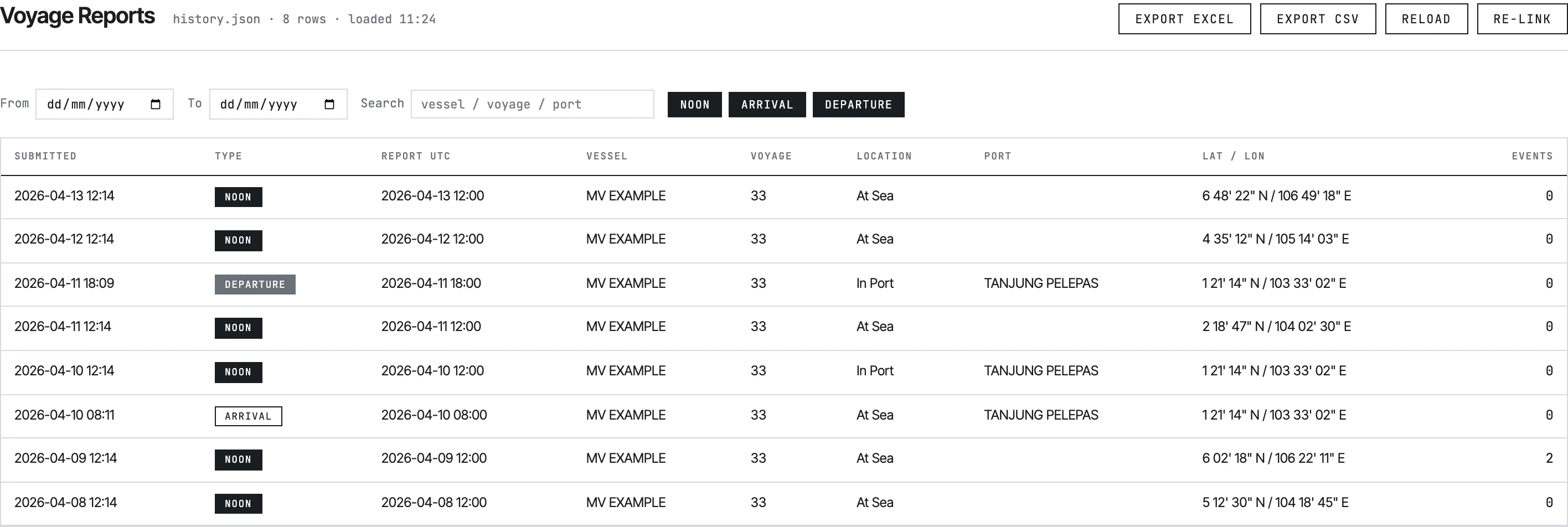
* Lists every submission across **four tabs**: Voyage Reports, Statement of Facts, Bunker Reports, Month-End ROB
* Filters by date range and free-text search; the Voyage tab adds NOON / ARRIVAL / DEPARTURE pill toggles
* Clicks a row → opens a detail modal with all 90+ fields organised into seven zones, plus child tables for events, port activities, fuel breakdowns, BDN data
* Exports the filtered set to **CSV** or **Excel** (multi-sheet SpreadsheetML)
* Exports a single report from the detail modal to Excel or Print
## What it doesn't do
* **No editing.** FSA permission is `mode: 'read'`. The viewer cannot modify `history.json`.
* **No deletion.** Same reason.
* **No PDF export.** Print uses the browser's print dialog; CSV and Excel are the only file outputs.
* **No vessel comparison.** It loads one `history.json` at a time. To compare vessels, switch the linked file via Re-link.
* **No map view.** No geographic visualisation.
## How it gets the data
The viewer never makes network requests. It reads the file the user selects via the **File System Access API**, a Chrome 86+ feature that bypasses CORS and avoids the `file://` restrictions that break a normal `fetch()` from a local HTML page.
The selected file's handle is persisted in **IndexedDB** so the viewer auto-loads the same file next time. The user can re-link a different file at any time.
See [Viewing past reports](/history/viewing) for the user flow and [Setting up history.json](/history/setup) for how the file gets created.
## Browser requirements
| Browser | Status |
| -------------- | --------------------------------------------------------------------- |
| **Chrome 86+** | ✅ Supported |
| **Edge 86+** | ✅ Supported |
| Firefox | ❌ No File System Access API — viewer shows "Unsupported browser" gate |
| Safari | ❌ No File System Access API — viewer shows "Unsupported browser" gate |
If a Master uses Firefox, the form *still works* (form Submit doesn't strictly require FSA), but the local archive and the viewer don't.
## The four tabs
NOON / ARRIVAL / DEPARTURE submissions. Most-used tab.
Columns: Submitted, Type, Report UTC, Vessel, Voyage, Location, Port, Lat/Lon, Events.
SOF submissions only.
Columns: Submitted, Report UTC, Vessel, Voyage, Port, Activities (count).
Bunker lifts only.
Columns: Submitted, Date, Vessel, Voyage, Port, BDN No, Quantity (MT).
Month-end bunker reconciliations only.
Columns: Submitted, Month, Vessel, Voyage.
The viewer auto-routes each submission to the correct tab based on its `reportType` field — `NOON` / `ARRIVAL` / `DEPARTURE` go to Voyage, `SOF` to Statement of Facts, `BUNKER` to Bunker, `MONTH_END_BUNKER` to Month-End.
## Detail modal
Clicking any row opens a full-screen modal showing the entire submission in seven labeled zones:
| Zone | Examples |
| ---------------------- | --------------------------------------------------------- |
| Identity | reportName, version, voyageNumber, vesselName, vesselCode |
| Position & Port | lat/long, port, ETD, ice/STS/refuge flags |
| Vessel State | vessel condition, drafts, DWT, displacement |
| Distance & Main Engine | observed distance, slip, ME hours, RPM, KW |
| Generators & Auxiliary | gen 1–4 hours/KWhrs, aux boiler, incinerator |
| Lub Oil & Tanks | stern tube lub, ROBs, bilge, sludge |
| Slops & Fresh Water | slops, freshwater ROB / consumed / received |
Below the zones, child tables render:
* **Event cards** (NOON / ARRIVAL / DEPARTURE) — at-sea and in-port events with per-fuel consumption breakdown
* **Port Activities** (SOF) — activity rows with dynamic columns
* **BDN Fuel / Biofuel** (Bunker) — `gsfueltypeandquantity` and `bdnbiofuel` arrays
* **Upcoming Ports** — destination + ETA
## See also
* [Viewing past reports](/history/viewing) — the click path from "open the file" to "export to Excel"
* [Setting up history.json](/history/setup) — what the file is, how it gets created and linked
* [Data format](/history/data-format) — the JSON schema each row follows
## What it does
* Reads a `history.json` file from disk via the **File System Access API**
* Lists every submission across **four tabs**: Voyage Reports, Statement of Facts, Bunker Reports, Month-End ROB
* Filters by date range and free-text search; the Voyage tab adds NOON / ARRIVAL / DEPARTURE pill toggles
* Clicks a row → opens a detail modal with all 90+ fields organised into seven zones, plus child tables for events, port activities, fuel breakdowns, BDN data
* Exports the filtered set to **CSV** or **Excel** (multi-sheet SpreadsheetML)
* Exports a single report from the detail modal to Excel or Print
## What it doesn't do
* **No editing.** FSA permission is `mode: 'read'`. The viewer cannot modify `history.json`.
* **No deletion.** Same reason.
* **No PDF export.** Print uses the browser's print dialog; CSV and Excel are the only file outputs.
* **No vessel comparison.** It loads one `history.json` at a time. To compare vessels, switch the linked file via Re-link.
* **No map view.** No geographic visualisation.
## How it gets the data
The viewer never makes network requests. It reads the file the user selects via the **File System Access API**, a Chrome 86+ feature that bypasses CORS and avoids the `file://` restrictions that break a normal `fetch()` from a local HTML page.
The selected file's handle is persisted in **IndexedDB** so the viewer auto-loads the same file next time. The user can re-link a different file at any time.
See [Viewing past reports](/history/viewing) for the user flow and [Setting up history.json](/history/setup) for how the file gets created.
## Browser requirements
| Browser | Status |
| -------------- | --------------------------------------------------------------------- |
| **Chrome 86+** | ✅ Supported |
| **Edge 86+** | ✅ Supported |
| Firefox | ❌ No File System Access API — viewer shows "Unsupported browser" gate |
| Safari | ❌ No File System Access API — viewer shows "Unsupported browser" gate |
If a Master uses Firefox, the form *still works* (form Submit doesn't strictly require FSA), but the local archive and the viewer don't.
## The four tabs
NOON / ARRIVAL / DEPARTURE submissions. Most-used tab.
Columns: Submitted, Type, Report UTC, Vessel, Voyage, Location, Port, Lat/Lon, Events.
SOF submissions only.
Columns: Submitted, Report UTC, Vessel, Voyage, Port, Activities (count).
Bunker lifts only.
Columns: Submitted, Date, Vessel, Voyage, Port, BDN No, Quantity (MT).
Month-end bunker reconciliations only.
Columns: Submitted, Month, Vessel, Voyage.
The viewer auto-routes each submission to the correct tab based on its `reportType` field — `NOON` / `ARRIVAL` / `DEPARTURE` go to Voyage, `SOF` to Statement of Facts, `BUNKER` to Bunker, `MONTH_END_BUNKER` to Month-End.
## Detail modal
Clicking any row opens a full-screen modal showing the entire submission in seven labeled zones:
| Zone | Examples |
| ---------------------- | --------------------------------------------------------- |
| Identity | reportName, version, voyageNumber, vesselName, vesselCode |
| Position & Port | lat/long, port, ETD, ice/STS/refuge flags |
| Vessel State | vessel condition, drafts, DWT, displacement |
| Distance & Main Engine | observed distance, slip, ME hours, RPM, KW |
| Generators & Auxiliary | gen 1–4 hours/KWhrs, aux boiler, incinerator |
| Lub Oil & Tanks | stern tube lub, ROBs, bilge, sludge |
| Slops & Fresh Water | slops, freshwater ROB / consumed / received |
Below the zones, child tables render:
* **Event cards** (NOON / ARRIVAL / DEPARTURE) — at-sea and in-port events with per-fuel consumption breakdown
* **Port Activities** (SOF) — activity rows with dynamic columns
* **BDN Fuel / Biofuel** (Bunker) — `gsfueltypeandquantity` and `bdnbiofuel` arrays
* **Upcoming Ports** — destination + ETA
## See also
* [Viewing past reports](/history/viewing) — the click path from "open the file" to "export to Excel"
* [Setting up history.json](/history/setup) — what the file is, how it gets created and linked
* [Data format](/history/data-format) — the JSON schema each row follows