> ## Documentation Index
> Fetch the complete documentation index at: https://docs.appliedaifoundation.org/llms.txt
> Use this file to discover all available pages before exploring further.
# Validation
> Mandatory fields, blocking errors, non-blocking warnings, and how Settings limits drive the warnings.
The form has two layers of validation: **blocking errors** (you can't submit until they're fixed) and **non-blocking warnings** (you can submit, but the value is outside the configured range and someone will ask about it).
## Mandatory fields (blocking)
Mandatory fields are marked with a **blue left border** on the input. If a mandatory field is empty or invalid when you click Submit:
* An inline error message appears below the field
* The Submit button is blocked until the error is cleared
Examples on the Noon Report:
* Voyage Number, Location, Date/Time + GMT offset
* Latitude, Longitude (must parse as DMS)
* Vessel Condition
* Port (when In Port)
Each mandatory field is keyed off the HTML `required=""` attribute and styled by a `mandatory` CSS class.
## Format errors (blocking)
Some fields enforce a format on top of being non-empty:
| Field | Expected format | Error if wrong |
| -------------- | ---------------- | -------------------------- |
| Latitude | `DD MM' SS" N/S` | "Invalid latitude format" |
| Longitude | `DD MM' SS" E/W` | "Invalid longitude format" |
| Date | YYYY-MM-DD | "Invalid date" |
| Time | HH:MM (24h) | "Invalid time" |
| Numeric fields | Numbers only | "Must be a number" |
The form auto-formats DMS strings on tab-out where possible — type `6 1 54 N` and it becomes `6 1' 54" N`.
## Auto-calculated fields (read-only)
These can never be wrong because you can't type into them. Fix the inputs that feed them:
| Field | Formula |
| --------------- | ----------------------------------------------------------------- |
| Slip % | `(observed_distance − engine_distance) / observed_distance × 100` |
| Reported Speed | `observed_distance / steaming_hours` |
| Average RPM | `main_engine_revs / (main_engine_hours × 60)` |
| Average KW | `main_engine_kwhrs / main_engine_hours` |
| Mean Draft | `(fwd_draft + aft_draft) / 2` |
| Generator KWhrs | `generator_hours × average_kw` |
## Validation limits (non-blocking warnings)
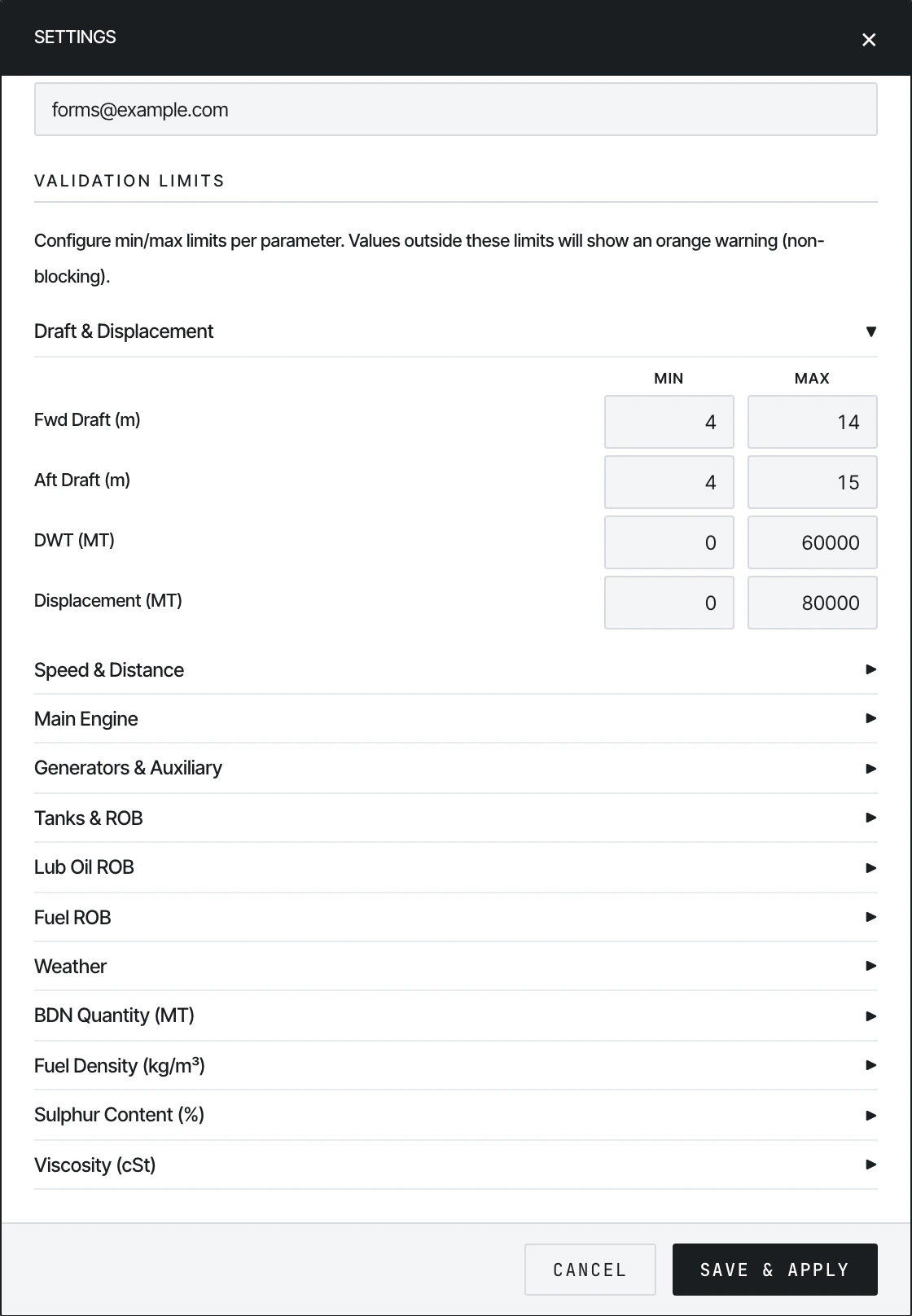
The Settings panel has a **Validation Limits** section with collapsible groups. Each group lets the office configure a per-vessel **Min** and **Max** for parameters like `Reported Speed`, `Bilge Water ROB`, `BDN Quantity`, etc.
 When the crew types a value outside the configured range:
* An **orange warning** appears next to the input
* The form **does not block Submit** — the warning is informational
The reasoning: limits exist to flag suspicious values, not to enforce them. If a vessel legitimately has a 30-knot speed in storm-following conditions, the Master can still submit.
### Configurable groups
| Group | Parameters |
| ---------------------- | ------------------------------------------------------------------------ |
| Draft & Displacement | Fwd Draft, Aft Draft, DWT, Displacement |
| Speed & Distance | Reported Speed, CP Speed, Observed/Engine/Speed Log Distance |
| Main Engine | ME Hours, Revs, KWhrs, Average KW, ME Output, Steaming Hours |
| Generators & Auxiliary | Gen 1–4 Hours/KWhrs, A/E Sea Load, Aux Boiler, Incinerator, FW Generator |
| Tanks & ROB | Bilge Water, Sludge, Fresh Water, Slops |
| Lub Oil ROB | High TBN, Low TBN, ME Crankcase, A/E Lub Oil |
| Fuel ROB | HSFO, LSMGO, VLSFO, VLSFO (≤80 cSt) |
| Weather | Air Temp, Sea Temp, Bar Pressure, Avg Cargo Temp, Heading |
| BDN Quantity (MT) | Per fuel grade |
| Fuel Density (kg/m³) | Per fuel grade |
| Sulphur Content (%) | Per fuel grade |
| Viscosity (cSt) | Per fuel grade |
Both Min and Max are optional — leave a field blank to disable that bound for that parameter.
### Setting limits per vessel
This is a **shore-side** task done once per vessel:
1. Open the form on the office machine
2. Click the gear icon → Settings
3. Expand each group, type Min/Max for each parameter
4. Click **Save & Apply**
5. Click **Export Configured HTML** to download a vessel-specific copy with the limits baked in
The downloaded file is what gets sent to the vessel. localStorage is per-machine and per-file-path, so the limits won't travel unless they're exported into the HTML.
See [History setup → Part 1](/history/setup) for the full office-side configuration walkthrough.
## Cross-field validation
A few fields validate against each other:
* **Steaming Hours ≤ Main Engine Hours** — steaming time can't exceed engine running time
* **Engine Distance ≤ Observed Distance** — slip can't be negative
* **Mean Draft = (Fwd + Aft) / 2** — auto-recomputed
* **Generator KWhrs derives from Hours** — typing one updates the other if Average KW is set
* **Aft Draft − Fwd Draft = Trim** — informational only
These produce inline errors when violated.
## Error UI
* **Red** inline message below an input → blocking error
* **Orange** badge or border → non-blocking warning (Settings limit)
* **Grey** input → auto-calculated, read-only
* **Blue** left border → mandatory field
## See also
* [Submitting](/form/submitting) — what happens after validation passes
* [Setting up history.json → Part 1](/history/setup) — how the office configures limits and exports the form
When the crew types a value outside the configured range:
* An **orange warning** appears next to the input
* The form **does not block Submit** — the warning is informational
The reasoning: limits exist to flag suspicious values, not to enforce them. If a vessel legitimately has a 30-knot speed in storm-following conditions, the Master can still submit.
### Configurable groups
| Group | Parameters |
| ---------------------- | ------------------------------------------------------------------------ |
| Draft & Displacement | Fwd Draft, Aft Draft, DWT, Displacement |
| Speed & Distance | Reported Speed, CP Speed, Observed/Engine/Speed Log Distance |
| Main Engine | ME Hours, Revs, KWhrs, Average KW, ME Output, Steaming Hours |
| Generators & Auxiliary | Gen 1–4 Hours/KWhrs, A/E Sea Load, Aux Boiler, Incinerator, FW Generator |
| Tanks & ROB | Bilge Water, Sludge, Fresh Water, Slops |
| Lub Oil ROB | High TBN, Low TBN, ME Crankcase, A/E Lub Oil |
| Fuel ROB | HSFO, LSMGO, VLSFO, VLSFO (≤80 cSt) |
| Weather | Air Temp, Sea Temp, Bar Pressure, Avg Cargo Temp, Heading |
| BDN Quantity (MT) | Per fuel grade |
| Fuel Density (kg/m³) | Per fuel grade |
| Sulphur Content (%) | Per fuel grade |
| Viscosity (cSt) | Per fuel grade |
Both Min and Max are optional — leave a field blank to disable that bound for that parameter.
### Setting limits per vessel
This is a **shore-side** task done once per vessel:
1. Open the form on the office machine
2. Click the gear icon → Settings
3. Expand each group, type Min/Max for each parameter
4. Click **Save & Apply**
5. Click **Export Configured HTML** to download a vessel-specific copy with the limits baked in
The downloaded file is what gets sent to the vessel. localStorage is per-machine and per-file-path, so the limits won't travel unless they're exported into the HTML.
See [History setup → Part 1](/history/setup) for the full office-side configuration walkthrough.
## Cross-field validation
A few fields validate against each other:
* **Steaming Hours ≤ Main Engine Hours** — steaming time can't exceed engine running time
* **Engine Distance ≤ Observed Distance** — slip can't be negative
* **Mean Draft = (Fwd + Aft) / 2** — auto-recomputed
* **Generator KWhrs derives from Hours** — typing one updates the other if Average KW is set
* **Aft Draft − Fwd Draft = Trim** — informational only
These produce inline errors when violated.
## Error UI
* **Red** inline message below an input → blocking error
* **Orange** badge or border → non-blocking warning (Settings limit)
* **Grey** input → auto-calculated, read-only
* **Blue** left border → mandatory field
## See also
* [Submitting](/form/submitting) — what happens after validation passes
* [Setting up history.json → Part 1](/history/setup) — how the office configures limits and exports the form