> ## Documentation Index
> Fetch the complete documentation index at: https://docs.appliedaifoundation.org/llms.txt
> Use this file to discover all available pages before exploring further.
# Form overview
> What the form is, the report tabs, the left-rail navigation, and how the file is structured.
The Metaweave form is a **single self-contained HTML file** (\~13 MB) that the office sends to each vessel. It runs offline in Chrome or Edge, with everything embedded — jQuery, CryptoJS, all dropdown lists, all validation rules. No internet, no installs, no server.
 ## The report tabs
The left sidebar lists every report type the form supports:
| Tab | When to send | Notes |
| ------------------------------- | ---------------------------------------------------- | ------------------------------------------ |
| **Noon Report** | Daily at noon, At Sea or In Port | The default tab on open |
| **Arrival Report** | At End of Sea Passage (EOSP) | Triggered on arrival at a port |
| **Departure Report** | At Commencement of Sea Passage (COSP) | Triggered on departure |
| **Bunker Report** | Every bunker lift | Separate from consumption reported in Noon |
| **Statement of Facts** | After cargo ops at one port | Activity log + cargo details |
| **Delay / Off-Hire Notice** | When the vessel goes off-hire or experiences a delay | Captures off-hire periods and reason codes |
| **Cargo Handling** | Cargo loading / discharge reporting | Cargo grades, quantities, B/L numbers |
| **Terminal Satisfaction Sheet** | After a port call | Feedback on terminal performance |
| **Month-End Bunker Data** | Last day of each calendar month | ROB reconciliation across all fuel grades |
## Layout
Every tab follows the same vertical layout:
1. **Vessel block** (pre-populated by the office) — IMO, vessel name, vessel code
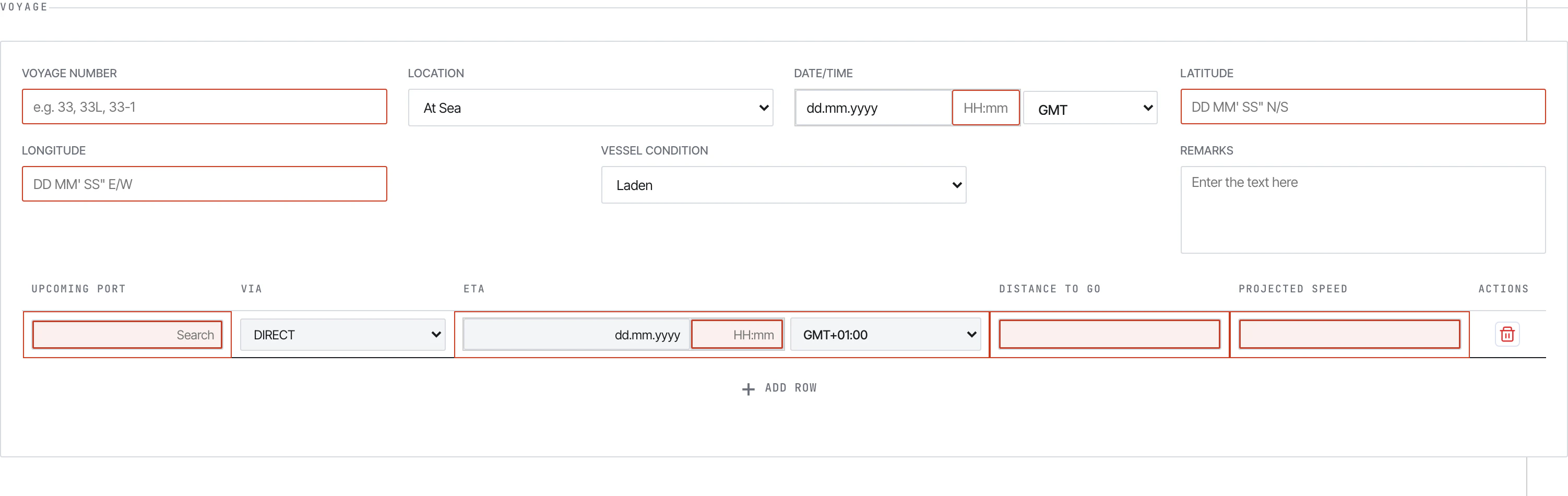
2. **Voyage block** — voyage number, location (At Sea / In Port), date/time + GMT offset, lat/long, vessel condition, port, ETA/ETD, ice/STS/refuge flags, remarks
3. **Distance and Vessel** — CP speed, observed distance, engine hours, RPM, KW, generators, ME parameters
4. **Weather** — wind, sea, swell, visibility, air/sea temperature, pressure
5. **Events** — at-sea or in-port event blocks with per-fuel consumption breakdown
6. **Bunker ROB** — fuel remaining-on-board summary by fuel type
7. **Technical Parameters** — torque, exhaust gas temperatures, scavenge pressure, air-cooler temps
8. **Scrubber** — operating mode and breakdown periods
9. **FOWE System** — Fuel Oil Water Emulsion availability and usage periods
10. **Slops & Fresh Water** — slop ROBs (water/oil), bilge, sludge, lube oils, fresh water
11. **Master's name** — first/last name signature
12. **Submit** — at the bottom of every tab
Bunker, SOF, and the supplementary report tabs use different field sets — see [Filling reports](/form/filling-reports) for the per-tab walkthrough.
## Navigation
The left sidebar is the only navigation. Clicking a tab swaps the main content area. There is no pagination — the entire report scrolls in one continuous form.
A **gear icon** at the bottom of the sidebar opens the **Settings** modal: vessel identifiers, validation limits, and the link to `history.json`. See [Setting up history.json](/history/setup) for the office and vessel setup steps.
## What you see vs. what's stored
The form has many **hidden inputs** the user never touches: principal ID, client IDs, form identifier, ref ID, isBarge flag, client name. These travel with the encrypted payload and let the pipeline route the submission correctly.
Auto-calculated fields are **read-only** — the form computes them from your inputs:
* **Slip %** = `(observed distance − engine distance) / observed distance × 100`
* **Reported Speed** = `observed distance / steaming hours`
* **Average RPM** = `main engine revs / (main engine hours × 60)`
* **Average KW** = `main engine KWhrs / main engine hours`
* **Mean Draft** = `(fwd draft + aft draft) / 2`
If a calculated value looks wrong, fix the inputs that feed it — you can't overtype.
## Browser requirements
* **Chrome 86+** or **Edge 86+** — required for the local archive (File System Access API).
* **Firefox / Safari** — the form *opens* and submits, but the archive feature is disabled because no other browser supports the FSA API.
## File structure
The form is built from these embedded pieces (all inside the single HTML file):
| Section | Purpose |
| ----------------------------------------------- | ------------------------------------------------------------------- |
| `` | Meta + viewport + cache headers |
| Inline CSS | All styles. Indigo `#4F46E5` primary, navy `#313a61` dialog headers |
| jQuery | DOM manipulation library |
| CryptoJS | AES-128-CBC + PKCS7 padding |
| Tab content divs | One `
## The report tabs
The left sidebar lists every report type the form supports:
| Tab | When to send | Notes |
| ------------------------------- | ---------------------------------------------------- | ------------------------------------------ |
| **Noon Report** | Daily at noon, At Sea or In Port | The default tab on open |
| **Arrival Report** | At End of Sea Passage (EOSP) | Triggered on arrival at a port |
| **Departure Report** | At Commencement of Sea Passage (COSP) | Triggered on departure |
| **Bunker Report** | Every bunker lift | Separate from consumption reported in Noon |
| **Statement of Facts** | After cargo ops at one port | Activity log + cargo details |
| **Delay / Off-Hire Notice** | When the vessel goes off-hire or experiences a delay | Captures off-hire periods and reason codes |
| **Cargo Handling** | Cargo loading / discharge reporting | Cargo grades, quantities, B/L numbers |
| **Terminal Satisfaction Sheet** | After a port call | Feedback on terminal performance |
| **Month-End Bunker Data** | Last day of each calendar month | ROB reconciliation across all fuel grades |
## Layout
Every tab follows the same vertical layout:
1. **Vessel block** (pre-populated by the office) — IMO, vessel name, vessel code
2. **Voyage block** — voyage number, location (At Sea / In Port), date/time + GMT offset, lat/long, vessel condition, port, ETA/ETD, ice/STS/refuge flags, remarks
3. **Distance and Vessel** — CP speed, observed distance, engine hours, RPM, KW, generators, ME parameters
4. **Weather** — wind, sea, swell, visibility, air/sea temperature, pressure
5. **Events** — at-sea or in-port event blocks with per-fuel consumption breakdown
6. **Bunker ROB** — fuel remaining-on-board summary by fuel type
7. **Technical Parameters** — torque, exhaust gas temperatures, scavenge pressure, air-cooler temps
8. **Scrubber** — operating mode and breakdown periods
9. **FOWE System** — Fuel Oil Water Emulsion availability and usage periods
10. **Slops & Fresh Water** — slop ROBs (water/oil), bilge, sludge, lube oils, fresh water
11. **Master's name** — first/last name signature
12. **Submit** — at the bottom of every tab
Bunker, SOF, and the supplementary report tabs use different field sets — see [Filling reports](/form/filling-reports) for the per-tab walkthrough.
## Navigation
The left sidebar is the only navigation. Clicking a tab swaps the main content area. There is no pagination — the entire report scrolls in one continuous form.
A **gear icon** at the bottom of the sidebar opens the **Settings** modal: vessel identifiers, validation limits, and the link to `history.json`. See [Setting up history.json](/history/setup) for the office and vessel setup steps.
## What you see vs. what's stored
The form has many **hidden inputs** the user never touches: principal ID, client IDs, form identifier, ref ID, isBarge flag, client name. These travel with the encrypted payload and let the pipeline route the submission correctly.
Auto-calculated fields are **read-only** — the form computes them from your inputs:
* **Slip %** = `(observed distance − engine distance) / observed distance × 100`
* **Reported Speed** = `observed distance / steaming hours`
* **Average RPM** = `main engine revs / (main engine hours × 60)`
* **Average KW** = `main engine KWhrs / main engine hours`
* **Mean Draft** = `(fwd draft + aft draft) / 2`
If a calculated value looks wrong, fix the inputs that feed it — you can't overtype.
## Browser requirements
* **Chrome 86+** or **Edge 86+** — required for the local archive (File System Access API).
* **Firefox / Safari** — the form *opens* and submits, but the archive feature is disabled because no other browser supports the FSA API.
## File structure
The form is built from these embedded pieces (all inside the single HTML file):
| Section | Purpose |
| ----------------------------------------------- | ------------------------------------------------------------------- |
| `` | Meta + viewport + cache headers |
| Inline CSS | All styles. Indigo `#4F46E5` primary, navy `#313a61` dialog headers |
| jQuery | DOM manipulation library |
| CryptoJS | AES-128-CBC + PKCS7 padding |
| Tab content divs | One `` per report type |
| `_FormControl` | Submit handler |
| `PreviewControl` | Encryption + preview dialog |
| `DocumentControl` | Tab switching |
| `DateTimeControl`, `DelayDurationControl`, etc. | Per-field validation logic |
| Settings modal | Vessel config + validation limits + history link |
| History archive functions | FSA-based `history.json` read/write |
## See also
* [Filling reports](/form/filling-reports) — section-by-section walkthrough of each tab
* [Submitting](/form/submitting) — the Submit modal, encryption, mail flow
* [Validation](/form/validation) — required fields, errors, validation limits
* [Guidelines PDFs](/form/guidelines-pdf) — what each of the seven guideline documents covers