> ## Documentation Index
> Fetch the complete documentation index at: https://docs.appliedaifoundation.org/llms.txt
> Use this file to discover all available pages before exploring further.
# Reports hub
> One-click generation of all five regulatory reports.
The Reports hub is where compliance officers spend filing season. It centralises all five regulatory outputs — pick a vessel, pick a report, hit download.
 ## What's on the page
### Vessel selector
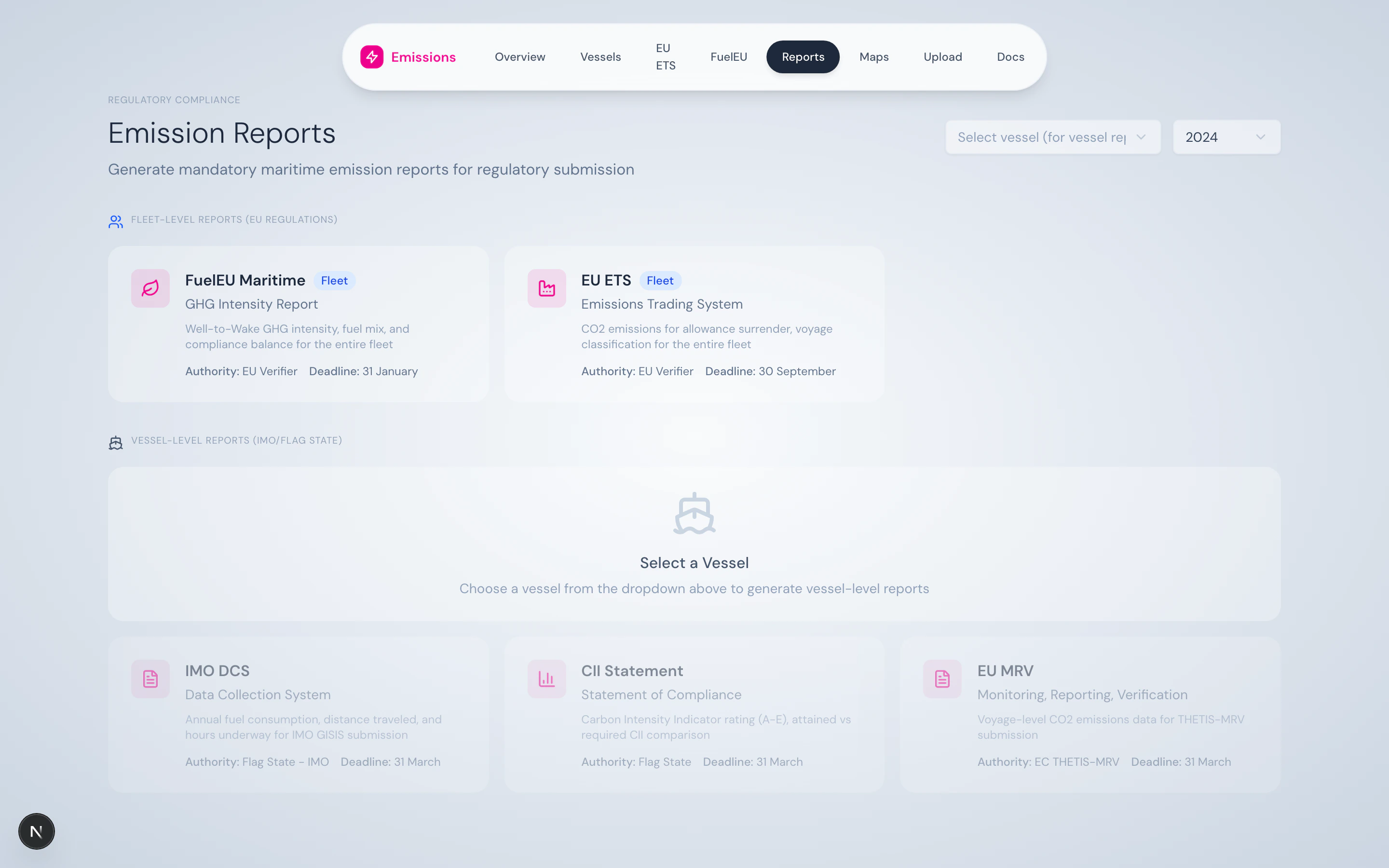
A dropdown at the top picks the vessel for vessel-level reports. The year selector picks the reporting year. Fleet-level reports don't need a vessel selection.
### Five report cards
**Vessel-level.** Annual fuel consumption, distance, hours underway. Submitted via flag state to IMO GISIS. Deadline: 31 March.
**Vessel-level.** Attained vs. Required CII, A–E rating, reefer correction. Statement of Compliance for flag state. Deadline: 31 March.
**Vessel-level.** Voyage-level CO₂ emissions for THETIS-MRV. Deadline: 31 March.
**Fleet-level.** Voyage classification and emissions for allowance surrender. Deadline: 30 September.
**Fleet-level.** WtW GHG intensity, fuel mix, compliance balance. Deadline: 31 January.
Each card displays:
* Icon + title
* Subtitle (the formal report name)
* Authority — Flag State / EU Verifier / EC THETIS-MRV
* Deadline
* Whether it's vessel-level or fleet-level
* A disabled state when prerequisites aren't met (e.g. no vessel selected)
### Generation flow
## What's on the page
### Vessel selector
A dropdown at the top picks the vessel for vessel-level reports. The year selector picks the reporting year. Fleet-level reports don't need a vessel selection.
### Five report cards
**Vessel-level.** Annual fuel consumption, distance, hours underway. Submitted via flag state to IMO GISIS. Deadline: 31 March.
**Vessel-level.** Attained vs. Required CII, A–E rating, reefer correction. Statement of Compliance for flag state. Deadline: 31 March.
**Vessel-level.** Voyage-level CO₂ emissions for THETIS-MRV. Deadline: 31 March.
**Fleet-level.** Voyage classification and emissions for allowance surrender. Deadline: 30 September.
**Fleet-level.** WtW GHG intensity, fuel mix, compliance balance. Deadline: 31 January.
Each card displays:
* Icon + title
* Subtitle (the formal report name)
* Authority — Flag State / EU Verifier / EC THETIS-MRV
* Deadline
* Whether it's vessel-level or fleet-level
* A disabled state when prerequisites aren't met (e.g. no vessel selected)
### Generation flow
 Clicking a card opens the generated report in a panel with Download and Print buttons. Generation typically takes 2–5 seconds.
## What you can do here
* Generate all five reports for a single vessel-year in one session
* Re-generate after a data correction without rebuilding any state
* Download as PDF for direct submission, or print for offline records
* Cross-check that the same numbers appear in the reports as in the dashboard (they do — same `VoyageSegmentService` is used)
## Source
Each report has a dedicated API route under `/api/reports/`:
* `/api/reports/imo-dcs/[imo]?year=YYYY`
* `/api/reports/cii-statement/[imo]?year=YYYY`
* `/api/reports/eu-mrv/[imo]?year=YYYY`
* `/api/reports/eu-ets?year=YYYY`
* `/api/reports/fueleu?year=YYYY`
PDFs are rendered client-side with `jspdf` + `jspdf-autotable`.
Clicking a card opens the generated report in a panel with Download and Print buttons. Generation typically takes 2–5 seconds.
## What you can do here
* Generate all five reports for a single vessel-year in one session
* Re-generate after a data correction without rebuilding any state
* Download as PDF for direct submission, or print for offline records
* Cross-check that the same numbers appear in the reports as in the dashboard (they do — same `VoyageSegmentService` is used)
## Source
Each report has a dedicated API route under `/api/reports/`:
* `/api/reports/imo-dcs/[imo]?year=YYYY`
* `/api/reports/cii-statement/[imo]?year=YYYY`
* `/api/reports/eu-mrv/[imo]?year=YYYY`
* `/api/reports/eu-ets?year=YYYY`
* `/api/reports/fueleu?year=YYYY`
PDFs are rendered client-side with `jspdf` + `jspdf-autotable`.