> ## Documentation Index
> Fetch the complete documentation index at: https://docs.appliedaifoundation.org/llms.txt
> Use this file to discover all available pages before exploring further.
# Maritime Emissions Dashboard
> Maritime emissions compliance for CII, EU ETS, FuelEU Maritime, EU MRV, and IMO DCS — in one dashboard.
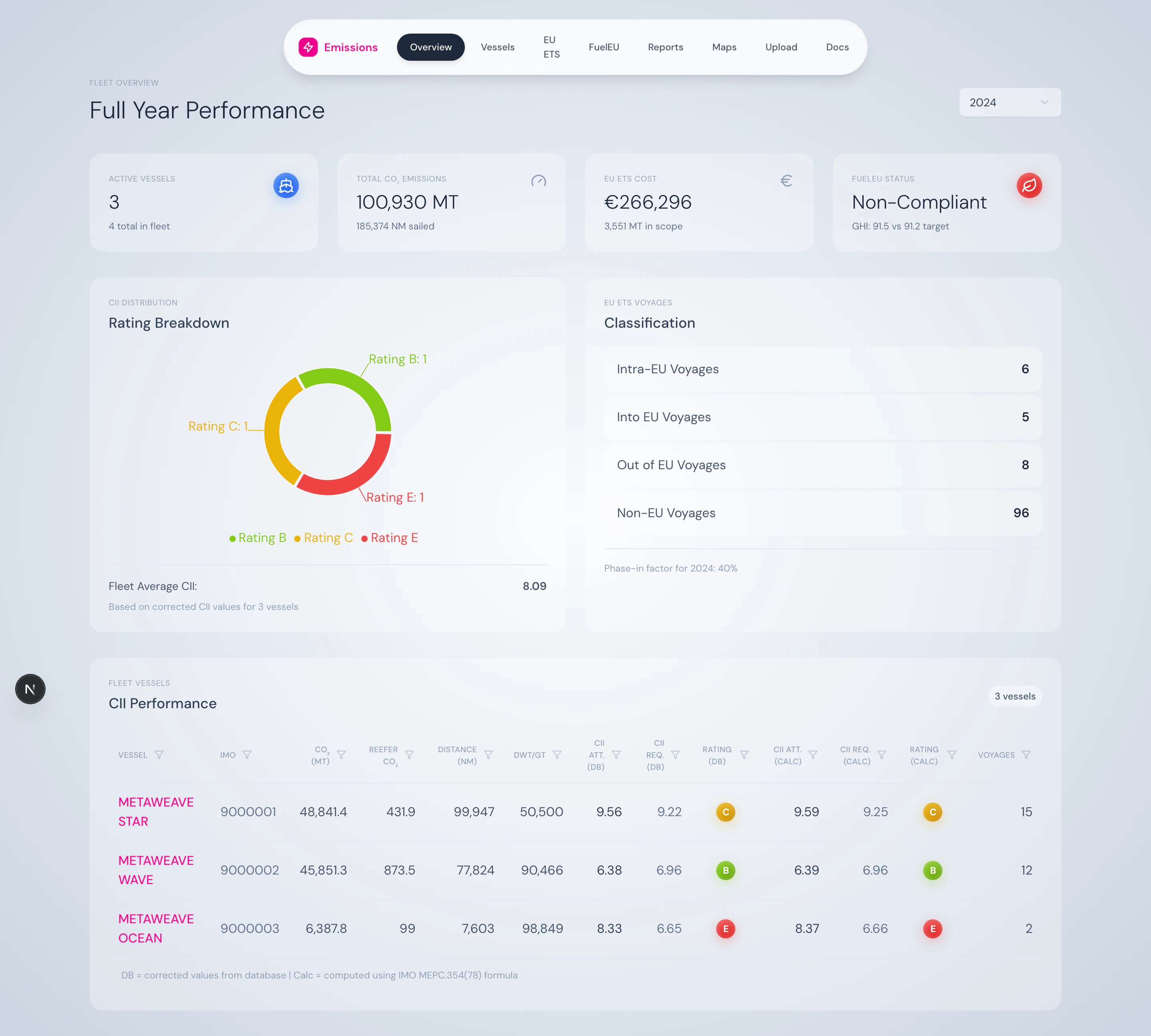
Open the dashboard in a new tab with our demo fleet preloaded — pick a year, drill into a vessel, and explore CII / EU ETS / FuelEU side by side.
 ## What is this?
The Maritime Emissions Dashboard turns vessel consumption logs into the regulatory artefacts every shipowner now has to file: a CII rating, an EU ETS allowance bill, a FuelEU GHG-intensity statement, an EU MRV voyage report, and an IMO DCS submission.
You upload your fleet's consumption data once. The platform computes everything, every regulation, every vessel, every voyage — and gives you the dashboards, drill-downs, and downloadable reports you need to operate and to file.
## What it covers
Carbon Intensity Indicator per MEPC.354(78). A–E ratings, attained vs. required, reefer correction per MEPC.355(78).
Voyage-by-voyage emissions classification, phase-in factors (40% / 70% / 100%), EUA cost projections.
Well-to-Wake GHG intensity across 19 fuel types. Compliance balance, penalty estimates, banking & pooling.
Voyage-level MRV data for THETIS-MRV and annual DCS submissions for your flag state.
## What you can do with it
A single year-selector drives the entire app. Every page — fleet overview, ETS, FuelEU, vessel detail — refreshes to the year you pick.
Click a row in the fleet table → land on the vessel page → expand a voyage → see leg-by-leg ETS coverage.
Daily timeline charts for CII, GHG intensity, and EU ETS exposure. Brush-to-zoom and target lines built in.
One-click downloads for IMO DCS, CII Statement, EU MRV, EU ETS, and FuelEU — formatted for the right authority.
## Who it's for
The platform is built for shipping companies operating between 2 and 100+ vessels who need to comply with overlapping IMO and EU regulations without standing up a data-engineering team to do it.
Typical users:
* **Fleet managers** monitoring CII ratings and EU ETS exposure
* **Environmental & compliance officers** preparing annual filings
* **Commercial teams** modelling EUA costs into voyage P\&L
* **IT / digital teams** integrating the platform into broader fleet systems
## What's next
Walk through the dashboard end-to-end with screenshots.
Compare CII, EU ETS, FuelEU, EU MRV, and IMO DCS side by side.
Page-by-page walkthrough of every screen.
Tech stack, data flow, environment variables, local setup.
## What is this?
The Maritime Emissions Dashboard turns vessel consumption logs into the regulatory artefacts every shipowner now has to file: a CII rating, an EU ETS allowance bill, a FuelEU GHG-intensity statement, an EU MRV voyage report, and an IMO DCS submission.
You upload your fleet's consumption data once. The platform computes everything, every regulation, every vessel, every voyage — and gives you the dashboards, drill-downs, and downloadable reports you need to operate and to file.
## What it covers
Carbon Intensity Indicator per MEPC.354(78). A–E ratings, attained vs. required, reefer correction per MEPC.355(78).
Voyage-by-voyage emissions classification, phase-in factors (40% / 70% / 100%), EUA cost projections.
Well-to-Wake GHG intensity across 19 fuel types. Compliance balance, penalty estimates, banking & pooling.
Voyage-level MRV data for THETIS-MRV and annual DCS submissions for your flag state.
## What you can do with it
A single year-selector drives the entire app. Every page — fleet overview, ETS, FuelEU, vessel detail — refreshes to the year you pick.
Click a row in the fleet table → land on the vessel page → expand a voyage → see leg-by-leg ETS coverage.
Daily timeline charts for CII, GHG intensity, and EU ETS exposure. Brush-to-zoom and target lines built in.
One-click downloads for IMO DCS, CII Statement, EU MRV, EU ETS, and FuelEU — formatted for the right authority.
## Who it's for
The platform is built for shipping companies operating between 2 and 100+ vessels who need to comply with overlapping IMO and EU regulations without standing up a data-engineering team to do it.
Typical users:
* **Fleet managers** monitoring CII ratings and EU ETS exposure
* **Environmental & compliance officers** preparing annual filings
* **Commercial teams** modelling EUA costs into voyage P\&L
* **IT / digital teams** integrating the platform into broader fleet systems
## What's next
Walk through the dashboard end-to-end with screenshots.
Compare CII, EU ETS, FuelEU, EU MRV, and IMO DCS side by side.
Page-by-page walkthrough of every screen.
Tech stack, data flow, environment variables, local setup.