> ## Documentation Index
> Fetch the complete documentation index at: https://docs.appliedaifoundation.org/llms.txt
> Use this file to discover all available pages before exploring further.
# Compliance Monitoring Tab
> Live IMO D-2 and USCG compliance status, treatment effectiveness summary, and system event audit trail.
 ## What this tab shows
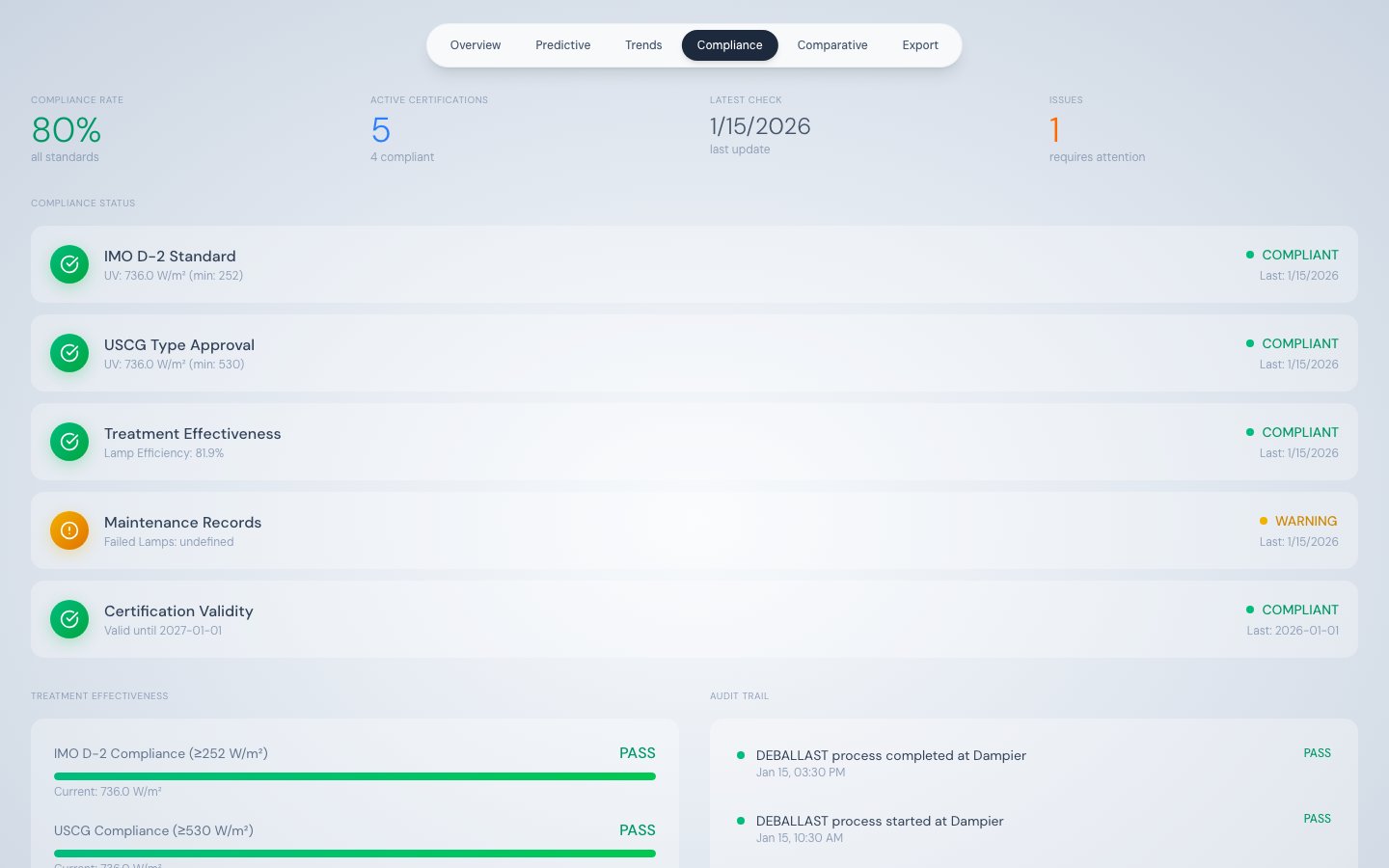
The Compliance tab performs real-time checks against two international regulations — IMO D-2 and USCG — using the most recent telemetry record. It also tracks treatment effectiveness, maintenance record status, and certification validity in one consolidated view.
Data sources:
* `/api/telemetry/latest` — for all live compliance values
* `/api/events?limit=20` — for the audit trail
## Summary stat row
| Stat | Description |
| --------------------- | ------------------------------------------------------------- |
| Compliance Rate | Percentage of the five compliance items that show COMPLIANT |
| Active Certifications | Total number of compliance items being tracked |
| Latest Check | Timestamp of the most recent telemetry record used for checks |
| Issues | Count of items showing WARNING or NON-COMPLIANT |
## The five compliance items
| # | Item | Logic | Compliant threshold |
| - | ----------------------- | --------------------------- | ----------------------------- |
| 1 | IMO D-2 Standard | `UVR_INTENSITY >= 252` | ≥ 252 W/m² |
| 2 | USCG Type Approval | `UVR_INTENSITY >= 530` | ≥ 530 W/m² |
| 3 | Treatment Effectiveness | `AVG_LAMP_EFFICIENCY >= 70` | ≥ 70% average lamp efficiency |
| 4 | Maintenance Records | `FAILED_LAMP_COUNT === 0` | Zero failed lamps |
| 5 | Certification Validity | Static expiry date check | Certificate not expired |
### Status indicators
| Icon | Status | Meaning |
| ----------------- | ------------- | ----------------------------------------------------- |
| Green circle (✓) | COMPLIANT | Threshold met |
| Yellow circle (!) | WARNING | Marginal zone — threshold approached or partially met |
| Red circle (✗) | NON-COMPLIANT | Threshold not met — action required |
## Treatment Effectiveness panel
Three horizontal progress bars show how far current values are from their compliance thresholds:
| Bar | Calculation | Full = |
| ------------------- | --------------------- | ----------------------- |
| IMO D-2 Compliance | `UVR_INTENSITY / 252` | 100% at 252 W/m² |
| USCG Compliance | `UVR_INTENSITY / 530` | 100% at 530 W/m² |
| Avg Lamp Efficiency | `AVG_LAMP_EFFICIENCY` | 100% at 100% efficiency |
Each bar shows the actual numeric value below it. Use these bars to monitor proximity to threshold limits — a bar at 80% of fill means there is a 20% margin before non-compliance.
## Audit Trail
## What this tab shows
The Compliance tab performs real-time checks against two international regulations — IMO D-2 and USCG — using the most recent telemetry record. It also tracks treatment effectiveness, maintenance record status, and certification validity in one consolidated view.
Data sources:
* `/api/telemetry/latest` — for all live compliance values
* `/api/events?limit=20` — for the audit trail
## Summary stat row
| Stat | Description |
| --------------------- | ------------------------------------------------------------- |
| Compliance Rate | Percentage of the five compliance items that show COMPLIANT |
| Active Certifications | Total number of compliance items being tracked |
| Latest Check | Timestamp of the most recent telemetry record used for checks |
| Issues | Count of items showing WARNING or NON-COMPLIANT |
## The five compliance items
| # | Item | Logic | Compliant threshold |
| - | ----------------------- | --------------------------- | ----------------------------- |
| 1 | IMO D-2 Standard | `UVR_INTENSITY >= 252` | ≥ 252 W/m² |
| 2 | USCG Type Approval | `UVR_INTENSITY >= 530` | ≥ 530 W/m² |
| 3 | Treatment Effectiveness | `AVG_LAMP_EFFICIENCY >= 70` | ≥ 70% average lamp efficiency |
| 4 | Maintenance Records | `FAILED_LAMP_COUNT === 0` | Zero failed lamps |
| 5 | Certification Validity | Static expiry date check | Certificate not expired |
### Status indicators
| Icon | Status | Meaning |
| ----------------- | ------------- | ----------------------------------------------------- |
| Green circle (✓) | COMPLIANT | Threshold met |
| Yellow circle (!) | WARNING | Marginal zone — threshold approached or partially met |
| Red circle (✗) | NON-COMPLIANT | Threshold not met — action required |
## Treatment Effectiveness panel
Three horizontal progress bars show how far current values are from their compliance thresholds:
| Bar | Calculation | Full = |
| ------------------- | --------------------- | ----------------------- |
| IMO D-2 Compliance | `UVR_INTENSITY / 252` | 100% at 252 W/m² |
| USCG Compliance | `UVR_INTENSITY / 530` | 100% at 530 W/m² |
| Avg Lamp Efficiency | `AVG_LAMP_EFFICIENCY` | 100% at 100% efficiency |
Each bar shows the actual numeric value below it. Use these bars to monitor proximity to threshold limits — a bar at 80% of fill means there is a 20% margin before non-compliance.
## Audit Trail
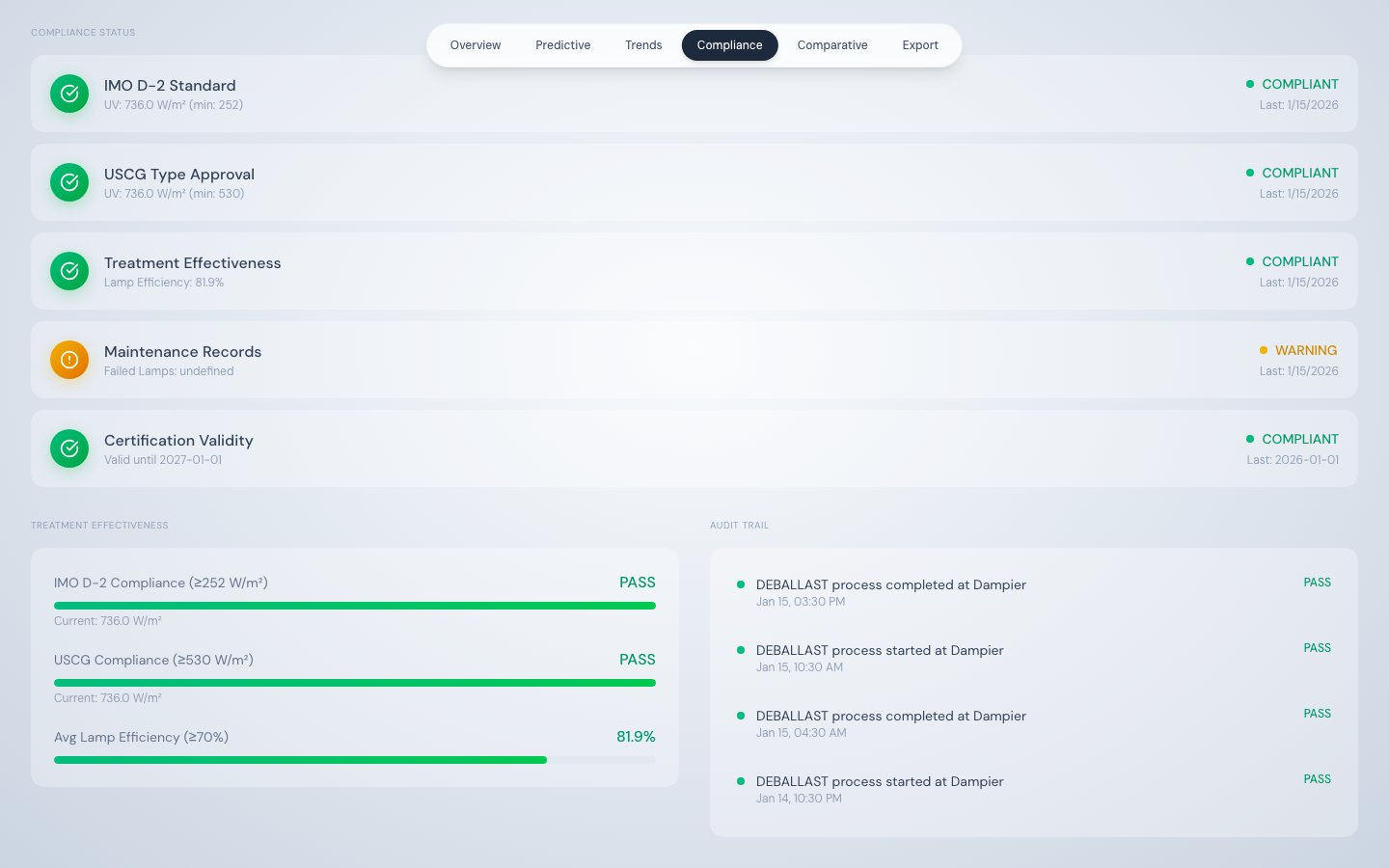 The Audit Trail panel shows the last 8 system events in reverse chronological order. Each entry displays:
* **Timestamp** — UTC datetime of the event
* **Event type and description** — human-readable summary
* **Result** — PASS for process start/stop events, ALERT for alarm events
| Event type | Displayed result |
| ---------------- | ---------------- |
| PROCESS\_START | PASS |
| PROCESS\_STOP | PASS |
| ALARM\_TRIGGERED | ALERT |
## Important limitation
The Compliance tab performs **real-time checks on the most recent telemetry record only**. It does not query a stored compliance log or historical compliance record. For official record-keeping and regulatory submissions, use the [Data Export tab](/product/data-export-tab) to download complete timestamped telemetry covering the full voyage period.
The Audit Trail panel shows the last 8 system events in reverse chronological order. Each entry displays:
* **Timestamp** — UTC datetime of the event
* **Event type and description** — human-readable summary
* **Result** — PASS for process start/stop events, ALERT for alarm events
| Event type | Displayed result |
| ---------------- | ---------------- |
| PROCESS\_START | PASS |
| PROCESS\_STOP | PASS |
| ALARM\_TRIGGERED | ALERT |
## Important limitation
The Compliance tab performs **real-time checks on the most recent telemetry record only**. It does not query a stored compliance log or historical compliance record. For official record-keeping and regulatory submissions, use the [Data Export tab](/product/data-export-tab) to download complete timestamped telemetry covering the full voyage period.